
Blog
Work from home expenses in Canada when your remote job is with a U.S. company
A remote employee in Canada can deduct work from home expenses when the employer is a U.S. company. The Canada Revenue Agency's main conditions: you were required to work from home, you paid the costs yourself, and your employer signed Form T2200. Who signs it depends on who employs you. A contractor claims a different way.
Published November 23, 2026
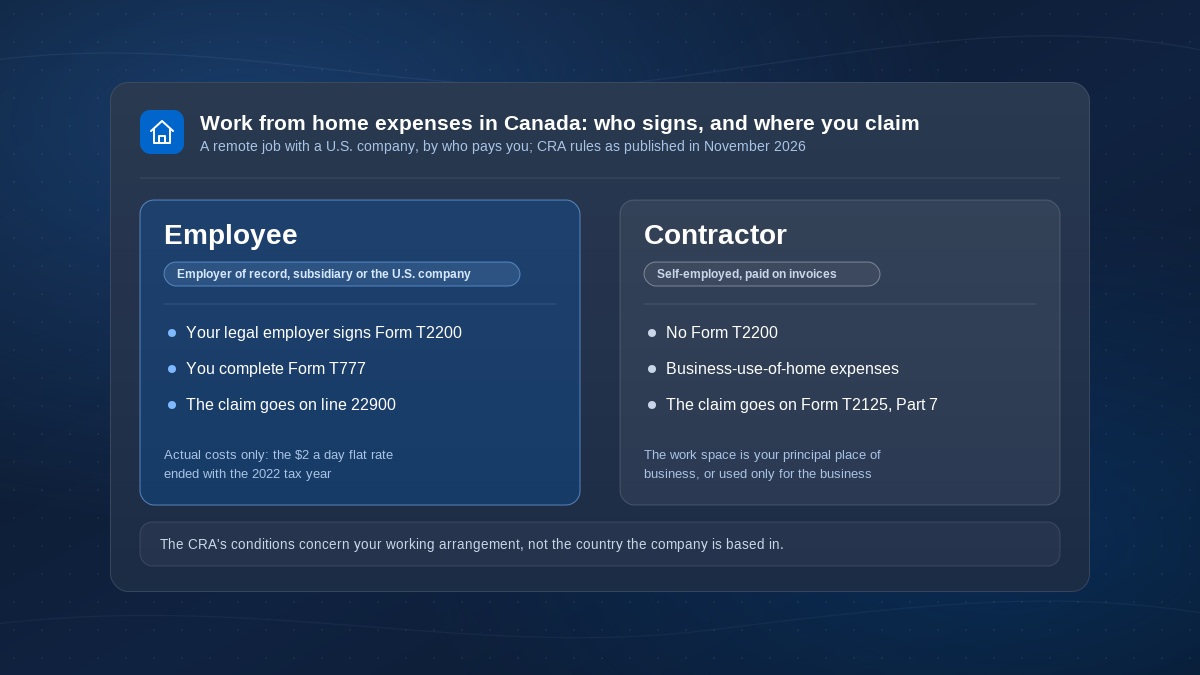
You can claim work from home expenses in Canada when your remote job is with a U.S. company. The main conditions the Canada Revenue Agency (CRA) sets for an employee are that you were required to work from home, you paid the costs yourself, and your employer signed Form T2200. The question that trips people up is who that employer is.
Can you claim work from home expenses in Canada when your employer is a U.S. company?
You can, if you are an employee and meet the CRA’s conditions. Nothing in them depends on where the company you work with is based. The CRA’s page on eligibility for the detailed method (page details dated January 20, 2026) lists what you must meet.
| Condition | What the CRA says | What it means for a remote job with a U.S. company |
|---|---|---|
| You were required to work from home | The requirement “does not have to be part of your employment contract, however, it should be a written or verbal agreement.” A formal telework arrangement you entered voluntarily counts | A fully remote role meets this. Have it in writing: your offer or agreement should say the work is done from your home |
| You paid the expenses | You were required to pay for expenses related to the work space, and you cannot claim anything your employer reimbursed or will reimburse | Rent and utilities are almost always yours. Costs the company repays are not |
| You used the space enough | You worked from home more than 50% of the time for at least four consecutive weeks in the year, or you use the space only for work and regularly meet clients there | Full-time remote work meets the first test for the whole year |
| The expenses are used directly in your work | The costs relate to doing your job | Personal use is separated out by the calculation below |
| Your employer signed Form T2200 | You hold a completed and signed Form T2200, Declaration of Conditions of Employment | The next section covers who signs when a U.S. company is involved |
Form T2200 is the document your employer fills out to certify your conditions of employment and that you were required to pay for employment expenses. You keep it. It is not sent in with your return.
Who signs Form T2200 when you work for a U.S. company?
Your legal employer signs it, which is the organization that pays you through Canadian payroll and issues your T4 slip. The CRA’s page on how to claim puts it in one line: Form T2200 “must be signed by your employer. It is up to your employer to determine who is authorized to sign these forms.” For a remote job with a U.S. company, that employer is one of three organizations, and a contractor has none.
| How you are paid | Who your employer is | Who signs Form T2200 |
|---|---|---|
| Through an employer of record in Canada | The employer of record | The employer of record. The U.S. company is its client, not your employer |
| By the U.S. company’s Canadian subsidiary | The subsidiary | The subsidiary |
| Directly by the U.S. company, on a Canadian payroll it runs itself | The U.S. company | The U.S. company. Its HR team may never have seen the form, so send the link |
| On invoices, as an independent contractor | Nobody: you are self-employed | No T2200 exists for you. See the contractor section below |
Working for a U.S. company from Canada explains these routes and which country taxes the income.
Three details from the CRA’s Employment Expenses guide (T4044) help when you ask:
- One form per employer. If you changed employers during the year, ask each one for its own T2200.
- An electronic signature is accepted. Employers are not required to sign by hand, which suits an employer you have never met in person.
- You keep it for six years. The CRA can ask to see the form and your receipts.
When you are employed through an employer of record, the form is signed by one organization while the working conditions were set by another. The employer of record certifies what your agreement says: that you work from home and which costs you pay. If your U.S. manager agreed something informally, such as a monthly internet reimbursement, make sure the employer of record knows, because a reimbursed cost cannot also be claimed. What to say when a U.S. company is not set up in Canada describes how the roles divide between the two.
An email you can copy
Send this to whoever handles payroll or HR questions at your legal employer. Replace the parts in brackets.
What can a remote employee in Canada claim?
A salaried employee can claim the employment-use share of the running costs of the home, plus supplies used up on the job. Purchases of equipment and furniture are out. The CRA’s page on expenses you can claim (page details dated January 20, 2026) lists them item by item.
| A salaried employee can claim | A salaried employee cannot claim |
|---|---|
| Electricity, heat and water | Mortgage interest and principal payments |
| Rent, if you rent your home | Home insurance and property taxes |
| Home internet access fees, at a reasonable cost | Internet connection fees and modem or router lease |
| Maintenance and minor repairs, such as light bulbs or repainting the work space | Renovations and other capital expenses, such as new windows or flooring |
| The utilities portion of condominium fees | Furniture: desk, chair, storage cabinets |
| Office supplies used up at work: paper, ink and toner, pens, folders, postage | Computer, laptop or tablet purchases, monitors, keyboards, webcams, headsets, printers, software |
| Long-distance calls made for work, and the work share of a basic cell phone plan when the CRA’s conditions are met | A monthly land-line rate, and buying a cell phone |
Home insurance and property taxes appear in the right-hand column because only commission employees can claim them. A commission employee is someone who sells goods or negotiates contracts and typically has an amount in box 42 of the T4 slip.
Two limits apply to every claim:
- Only the period you worked from home. If you started the remote job in May, the expenses from January to April do not count.
- No loss from employment. Work-space-in-the-home expenses cannot create or increase a loss. An amount you cannot use can be carried forward to the next year, as long as you report income from the same employer.
How do you calculate work from home expenses in Canada?
You multiply your eligible home costs by the share of your home that is work space and, for a shared room, by the share of the week you work there. The CRA’s page on determining your work space use separates two kinds of space:
- A designated room is used only for work, such as a spare room. Your hours do not reduce the claim.
- A common area has other uses, such as a kitchen table. The claim is reduced by hours worked divided by the 168 hours in a week. Forty hours is 23.8%.
Here is an illustrative example. Maya rents an 80 m² apartment in Ontario and works full time, all year, for a U.S. software company. Her rent, electricity, heat and home internet come to $2,230 a month, or $26,760 for the year.
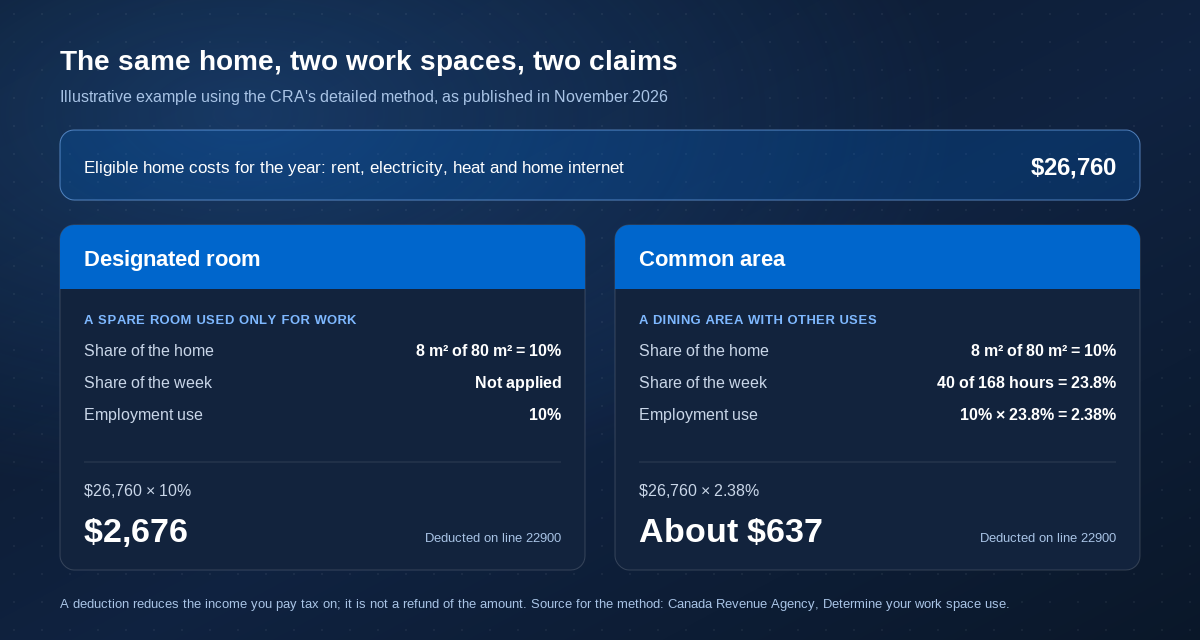
| Designated room | Common area | |
|---|---|---|
| Work space | A spare room of 8 m² | A dining area of 8 m² |
| Share of the home | 8 ÷ 80 = 10% | 8 ÷ 80 = 10% |
| Share of the week | Not applied | 40 ÷ 168 = 23.8% |
| Employment-use percentage | 10% | 10% × 23.8% = 2.38% |
| Claim on $26,760 | $2,676 | about $637 |
The result is a deduction, not a refund. It reduces the income you pay tax on, so what it saves depends on your tax rate. The CRA has a calculator for home office expenses that works out the percentages for you.
Two situations change the arithmetic:
- You and your spouse or common-law partner both work from home. Each expense can be claimed only once. You decide how to share it, and each of you calculates the use of your own work space.
- You moved during the year. Claim each home separately, because the size of the home and of the work space changed. If the move took you to another province, your payroll changes too: see province of employment for remote employees.
Is the $2 a day flat rate still available?
No. The temporary flat rate method, $2 for each day worked from home, applied to the 2020, 2021 and 2022 tax years only, as the CRA’s page on how to claim sets out. Its page on home office expenses for employees says so in its first line: “The temporary flat rate method does not apply to the 2023 and later tax years.”
Employees who worked from home in 2023 or later use the detailed method, which is the one described in this article: actual amounts, supported by documents, with a signed Form T2200. Some guides published since then still describe a flat rate. They are out of date.
What if the U.S. company pays for your equipment or gives you a stipend?
Then you claim less, and that is usually the better outcome. A desk or laptop the company buys or ships costs you nothing, while one you buy yourself is not deductible. Three cases come up in remote offers.
- The company provides the equipment. There is nothing for you to claim, and nothing you need to. Since a salaried employee cannot deduct a computer, monitor, chair or desk, this is the item to ask for.
- The company reimburses a cost against receipts. The CRA’s eligibility criteria are explicit that you “cannot claim any expenses that were or will be reimbursed by your employer.” If the company repays your internet bill, leave it out of your claim.
- The company pays a flat allowance. The CRA’s page on taxable benefits defines an allowance as an amount paid on top of salary to help with anticipated expenses, without receipts. Its page on line 22900 says you can deduct expenses only if you did not receive an allowance for them, “or the allowance you received is included in your income.” Ask your employer how a home office stipend is treated on your pay.
This is worth raising before you accept. A remote work policy or the offer itself should say who supplies the laptop and furniture and which costs are reimbursed. Under an employer of record, the U.S. company decides those terms and the employer of record records them in your Canadian employment agreement.
What if you invoice the U.S. company as a contractor?
Then none of the above applies, because you are self-employed. There is no Form T2200 and no Form T777. You claim business-use-of-home expenses on Form T2125, Statement of Business or Professional Activities, under the CRA’s rules for business-use-of-home expenses (page details dated August 31, 2026).
| Employee | Self-employed contractor | |
|---|---|---|
| Form from the company | Form T2200, signed by your employer | None |
| Where you claim | Form T777, then line 22900 of your return | Form T2125, Part 7 |
| Test for the space | More than 50% of your work time for four consecutive weeks, or used only for work and for meeting clients | Your principal place of business, or used only to earn business income and to meet clients regularly |
| Mortgage interest, property taxes, home insurance | Not claimable by a salaried employee | A part can be deducted |
| Limit | Cannot create or increase a loss from employment | Cannot create or increase a business loss |
A contractor’s list is longer, which makes invoicing look attractive. Weigh it against the rest of the picture: a contractor pays both halves of Canada Pension Plan contributions, a maximum base contribution of $8,460.90 in 2026 against $4,230.45 for an employee, and has no employer applying provincial employment standards. The label on the contract does not settle your status either. Contractor vs employee in Canada explains how the CRA tells the two apart.
How do you claim, step by step?
An employee claims on the personal tax return, using the CRA’s page on how to claim (page details dated January 20, 2026).
- Get the arrangement in writing. Your offer, agreement or policy should say you work from home.
- Keep documents all year. Rent receipts or your lease, utility and internet bills, and receipts for supplies.
- Measure once. Note the size of your work space and the finished area of your home, in square metres or square feet.
- Ask for Form T2200. Send the request to your legal employer after the year ends, using the email above.
- Complete Form T777. Statement of Employment Expenses is where the calculation goes.
- Enter the result on your return. The amount from line 9368 of Form T777 goes on line 22900, “Other employment expenses.”
- File Form T777 with the return, and keep the rest. Form T2200 and your receipts stay with you for six years.
In November 2026, the newest Form T2200 and Form T777 on the CRA’s site are the 2025 versions, and its guide covers the 2025 tax year. Use the forms for the year you are filing, and check the CRA’s pages again before you file a 2026 return.
This article covers the federal return. The CRA collects individual income tax for every province and territory except Québec, so a remote employee in Québec also files a provincial return with Revenu Québec and should check its conditions for employment expenses there.
How this works when InfraDev is your employer
InfraDev has been an employer of record in Canada since 2016. A U.S. company that wants to hire you without opening a Canadian entity can ask us to employ you on its behalf, and most hires start within 24–48 hours once terms are agreed.
In that arrangement InfraDev is your legal employer. We issue your Canadian employment agreement, run payroll and issue your T4, and the U.S. company directs your daily work. Questions about pay, time off or your agreement go to InfraDev. The working terms, including where you work and what equipment the company provides, are set by the U.S. company and written into your agreement.
If a U.S. company wants to hire you and is unsure how, the Employer of Record page is the one to send. If you are still looking, join the talent network.
Summary
- A remote employee in Canada can claim work from home expenses when the employer is a U.S. company. The conditions concern the arrangement, not the company’s country.
- Form T2200 is signed by your legal employer: the employer of record, the Canadian subsidiary, or the U.S. company if it runs Canadian payroll itself.
- The flat rate ended with the 2022 tax year. Claims use actual costs and Form T777.
- Rent, utilities, home internet access fees and supplies used up at work count. Furniture, computers and mortgage interest do not.
- A designated room gives a larger claim than a shared space, because hours do not reduce it.
- Reimbursed costs cannot be claimed. Ask how any stipend is treated on your pay.
- A contractor has no T2200 and claims business-use-of-home expenses on Form T2125.
Sources
- Canada Revenue Agency, Home office expenses for employees (page details dated January 20, 2026): overview, eligibility criteria, detailed method, expenses you can claim, determine your work space use and how to claim
- Canada Revenue Agency: Line 22900, Other employment expenses (tax year 2025; page details dated January 20, 2026)
- Canada Revenue Agency: Guide T4044, Employment Expenses 2025 (page details dated January 20, 2026)
- Canada Revenue Agency: Form T2200, Declaration of Conditions of Employment and Form T777, Statement of Employment Expenses (page details dated January 20, 2026 and February 26, 2026)
- Canada Revenue Agency: What is a taxable benefit (benefit, allowance and reimbursement; page details dated July 15, 2026)
- Canada Revenue Agency: Business-use-of-home expenses (page details dated August 31, 2026)
- Canada Revenue Agency: CPP contribution rates, maximums and exemptions (page details dated November 9, 2026)
- Canada Revenue Agency: Provincial and territorial tax and credits for individuals (page details dated January 26, 2026)
This article is general information, not legal or tax advice. Amounts are in Canadian dollars, and the worked example is illustrative. It reflects the CRA’s pages as published in November 2026; confirm your own claim with the CRA or a tax professional.
Frequently asked questions
Can I claim work from home expenses in Canada if my employer is a U.S. company?
A remote employee in Canada can claim work from home expenses whoever the employer is, when the Canada Revenue Agency's conditions are met: you were required to work from home, you paid the expenses yourself, you worked from home more than 50% of the time for at least four consecutive weeks, and your employer signed Form T2200.
Who signs Form T2200 when I work for a U.S. company through an employer of record?
The employer of record signs Form T2200, because it is your legal employer in Canada and the employer named on your T4 slip. The CRA says the form must be signed by your employer and leaves it to the employer to decide who is authorized. The working conditions it certifies come from what the U.S. company agreed.
What home office expenses can a remote employee in Canada claim?
A salaried remote employee in Canada can claim the employment-use share of electricity, heat, water, home internet access fees, minor repairs and rent, according to the Canada Revenue Agency. Office supplies used up on the job and long-distance calls for work also count. Mortgage interest, furniture and computer purchases cannot be claimed.
Can I deduct my desk, chair, monitor or laptop as a remote employee in Canada?
A salaried employee in Canada cannot deduct a desk, chair, monitor, keyboard, webcam, headset or a purchased computer. The Canada Revenue Agency's list of home office supplies marks each of them as not claimable. That is a reason to settle equipment with the U.S. company before you accept a remote offer.
Is the $2 a day flat rate still available for working from home in Canada?
The $2 a day temporary flat rate method is no longer available. The Canada Revenue Agency states that it applied to the 2020, 2021 and 2022 tax years only. For 2023 and later years, employees use the detailed method: actual expenses, supported by documents, with Form T777 and a signed Form T2200.
I invoice a U.S. company as a contractor from Canada. How do I claim my home office?
A self-employed contractor in Canada claims business-use-of-home expenses on Form T2125, with no Form T2200. The Canada Revenue Agency requires the workspace to be your principal place of business, or used only to earn business income and to meet clients regularly. The claim cannot create or increase a business loss.
Related reading
-
A U.S. company wants to hire you but isn't set up in Canada: what to say
When a U.S. company says it would like to hire you but is not set up in Canada, the hire is not over. The company cannot run Canadian payroll from the United States, and it does not have to. A Canadian employer of record can employ you on its behalf. Say so, send the short email below, and keep applying for U.S. roles.
Read the article -
Remote work policy in Canada: what a U.S. employer has to put in writing
No Canadian law requires a remote work policy by that name, but parts of one are mandatory. In Ontario, an employer with 25 or more employees must have written policies on disconnecting from work and on electronic monitoring. Health and safety law reaches the home office, and regulators in Québec and British Columbia point employers to a written policy.
Read the article -
Province of employment for remote employees in Canada: what a U.S. employer applies
The province of employment for remote employees in Canada is set by the CRA's payroll rules, not by where the person lives. A fully remote employee takes the province of the employer's establishment they are attached to, or the one that pays them. Employment standards follow the province where the work is done, so the two can differ.
Read the article
Next steps for hiring in Canada
Have a remote offer from a U.S. company?
Send your hiring manager our Employer of Record page, or book a 15-minute call together. We'll explain how we would employ you in Canada and what the company needs to do.