
Blog
Onboarding a remote employee in Canada: the first 30 days for a U.S. employer
A remote onboarding checklist for Canada, by deadline: the social insurance number within 3 days of the start, the TD1 tax forms when work begins, Ontario's written job information before day one for larger employers and its poster within 30 days, and safety training that reaches the home office.
Published November 24, 2026
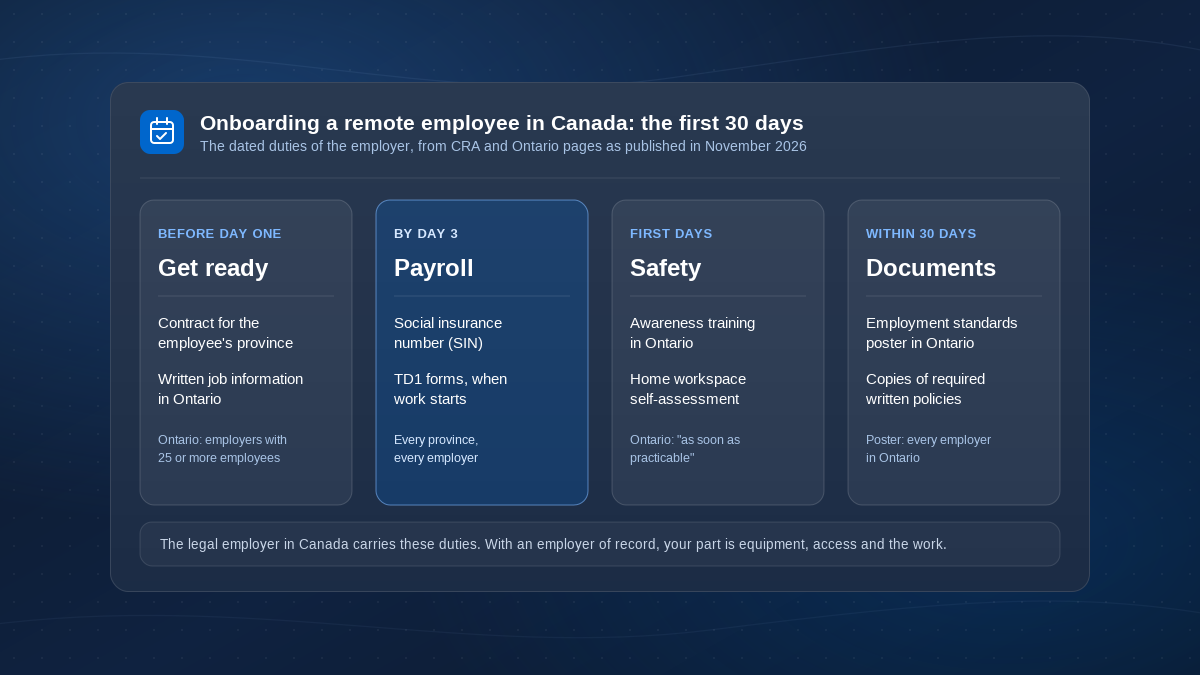
Onboarding a remote employee in Canada comes down to a short list of dated duties. The employer gets the social insurance number within 3 days of the start and the TD1 tax forms when work begins. Ontario adds written job information before day one for larger employers and a poster within 30 days. Safety training reaches the home office.
What does onboarding a remote employee in Canada involve?
Onboarding a remote employee in Canada has two halves: the legal employer’s duties under Canadian payroll and provincial law, and the practical work of bringing someone into a team they will never share an office with. The first half has deadlines. The second is yours to design.
Onboarding is everything between an accepted offer and a settled employee: the contract, payroll set-up, required notices and training, equipment, access and introductions.
For a U.S. employer, the forms and the source of the rules both change. The employee does not complete a Form W-4, which the IRS describes as the form that lets an employer withhold the correct federal income tax from pay. The Canadian counterpart is Form TD1. Employment standards and health and safety rules come from the province where the person works, so settle that first: the post on the province of employment for remote employees explains how.
What has to be ready before a remote employee’s first day in Canada?
Three things: a contract written for the employee’s province, a payroll that can pay them in Canada, and, in Ontario, written job information if the employer is large enough. Everything else can follow, but these three cannot be fixed after the fact without awkward conversations.
The employer. A company that employs the person directly needs its own payroll account with the Canada Revenue Agency (CRA). The CRA’s page on setting up employee payroll information says a new employer has to register for a payroll account before the first remittance due date. With an employer of record, the account, the contract and the payroll already exist.
Written job information in Ontario. Since July 1, 2025, an employer with 25 or more employees in Ontario on a new employee’s first day must give that employee six pieces of information in writing before the first day of work. Ontario’s guide to the Employment Standards Act lists them under mandatory information for employees (updated November 18, 2025):
- The employer’s legal name, and any operating or business name if different.
- The employer’s contact information: address, telephone number and one or more contact names.
- A general description of where the employee is expected to work at first.
- The starting hourly or other wage rate or commission.
- The pay period and pay day.
- A general description of the employee’s expected hours of work at first.
If providing the information before the first day is not practicable, the guide says it must follow as soon afterward as is reasonably possible. The 25 are counted by head across all locations in Ontario, part-time and casual employees included. A contract that already states these six points does the job, so write the remote work location and the pay day into it. The count is of the legal employer’s employees in Ontario: your own if you employ the person directly, the employer of record’s if you hire through one.
A trial project counts. The same guide says an employee’s first day of work may be the first day of a trial period, where the skills being assessed are ones the employer’s employees use. A paid “test week” before the paperwork is not a way around onboarding.
The contract in Québec. Section 41 of Québec’s Charter of the French language requires an employer to see that a written individual employment contract is drawn up in French, and that documents relating to conditions of employment and training documents produced for staff are in French. The section allows a contract in another language at the express wish of the parties, with an extra step for standard-form contracts: the employee must first have examined the French version. Hiring an employee in Québec covers the province in full.
What are the payroll deadlines in a remote employee’s first week?
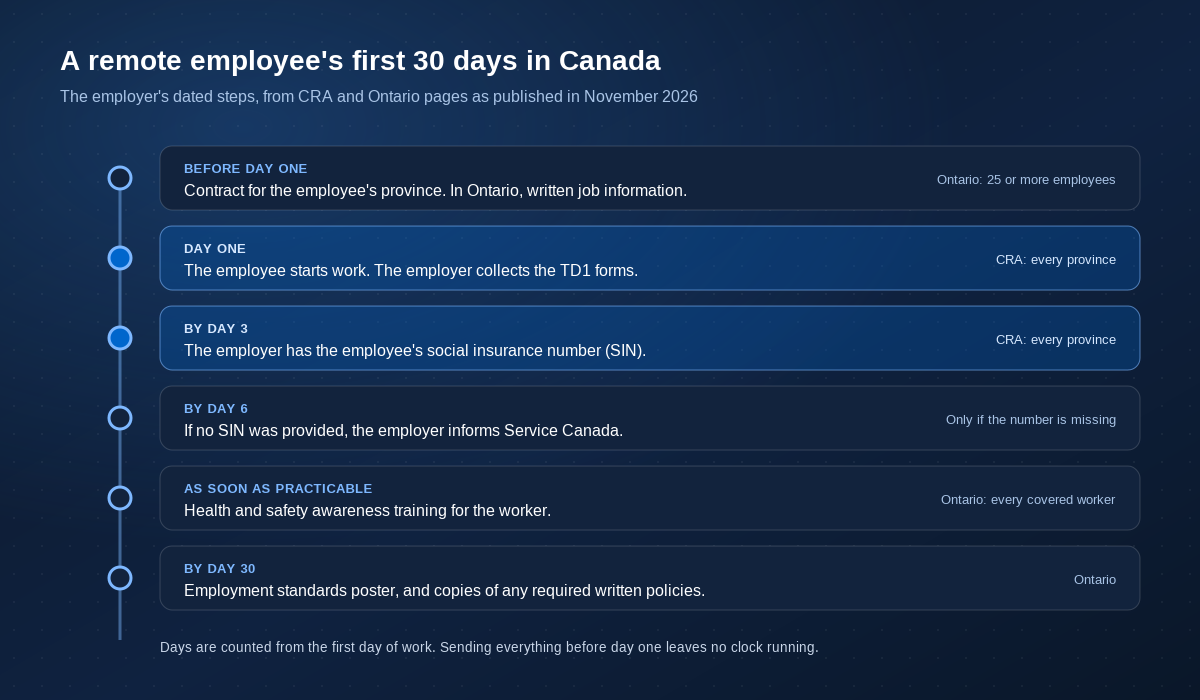
Two items of new hire paperwork carry a date: the social insurance number within 3 days of the start, and the TD1 forms when the employee starts work. Both come from the CRA, and both apply in every province.
A social insurance number (SIN) is the 9-digit number, issued by Service Canada, that an employee must provide to an employer when starting a job in Canada. The CRA’s page on getting the SIN from the individual sets out the employer’s side:
- Within 3 days. The employer has to get the SIN within 3 days of when the employee starts work.
- If it does not arrive. The employer shows it made a reasonable effort, informs Service Canada within 6 days of the employee starting, and still makes and remits deductions. A $100 penalty may apply to an employer that cannot show reasonable attempts.
- A SIN that begins with 9. These are temporary and valid only until the expiry date on the person’s immigration document. The employer must see that document and check that it has not expired.
Form TD1, Personal Tax Credits Return, tells the employer how much income tax to withhold. The CRA’s page on getting the completed TD1 forms says the employer must get the form when the employee starts work. Three details help:
- Everyone with a new employer fills out the federal TD1. A provincial or territorial TD1 is also required when the employee claims more than the basic personal amount.
- Without a TD1, the employer still runs payroll, and the deductions take only the basic personal amount into account.
- The employer keeps the completed forms with the employee’s records and does not send them to the CRA.
Québec is the exception for income tax. The CRA’s page on what to do after you set up your employee lists the income tax an employer deducts under its rules as “federal, provincial (except Quebec) and territorial”. Québec income tax is a second payroll relationship, explained in the Québec post linked above.
The CRA also allows TD1 forms to be completed and stored electronically, provided the system authenticates the employee’s identity, which suits a remote hire.
Workers’ compensation is the last first-week item for a company employing directly. Ontario’s Workplace Safety and Insurance Board says on its page on how to register a business (updated July 30, 2026) that most Ontario businesses with employees must register, within 10 calendar days of hiring the first employee. Some industries are not required to register, so the board asks each business to check its own activity.
What health and safety training does a remote employee in Canada need?
The same starting training as an employee on site, adapted to a desk at home. The three provinces checked for this article each place a training or information duty on the employer, and none of them exempts remote work.
- Ontario. Employers must ensure workers complete a basic awareness training program “as soon as practicable”. Ontario’s guide to the awareness training requirements (updated April 11, 2024) says this covers all workers under the Occupational Health and Safety Act, whatever their sector or status, and recommends completing it before the worker is exposed to hazards. The Act covers telework in a private residence, so a remote employee is included. A worker who shows proof of the same training from a previous job does not have to repeat it, once the employer verifies the content.
- British Columbia. WorkSafeBC’s page on training and orienting workers says safety belongs in a new worker’s orientation before they start working. Three topics must be in every orientation: rights and responsibilities, workplace hazards and safe work procedures. The employer keeps a record of the training. WorkSafeBC’s guidance on working from home adds that the employee should assess the home workspace and report hazards.
- Québec. Section 51 of the Act respecting occupational health and safety requires the employer to give the worker adequate information about the risks connected with the work, and appropriate training, assistance or supervision. Section 5.1 applies the Act to a worker carrying on telework and to the employer.
For a remote software or finance role, this is a short training session in the first days, plus a workspace self-assessment. The post on a remote work policy in Canada covers the home-office safety terms that belong in writing.
What is due within 30 days of a remote employee’s start in Ontario?
Up to three documents: the employment standards poster for every new employee, and copies of the written policies on disconnecting from work and on electronic monitoring where the employer is required to have them.
| Document | Who has to provide it | Deadline |
|---|---|---|
| Employment standards poster (“Employment Standards in Ontario”) | Every employer covered by the Employment Standards Act | Within 30 days of the person becoming an employee |
| Written policy on disconnecting from work | Employers with 25 or more employees in Ontario on January 1 | Within 30 calendar days of the new employee being hired |
| Written policy on electronic monitoring | Employers with 25 or more employees in Ontario on January 1 | Within 30 calendar days of the later of the day the policy must be in place and the day the person becomes an employee |
The poster is given once per employee, and Ontario’s guide allows it as an email attachment or a link, provided the employee can open and print it. That makes it an easy item for a remote hire’s welcome email. The policy deadlines come from the guide’s chapters on disconnecting from work and electronic monitoring, both updated July 8, 2024.
What else belongs on a remote onboarding checklist for Canada?
The items above have a legal deadline. The rest of a remote onboarding checklist has none, but a first pay or a first week goes wrong without it. None of these comes from a statute cited here; they are practice.
- Banking details. The employee’s Canadian bank account for direct deposit, collected by whoever runs payroll, in time for the first pay day.
- Benefits enrolment. If the employer offers a group plan, the enrolment forms and any waiting period. What a plan usually contains is covered in the post on employee benefits in Canada.
- Background and reference checks. If your company runs them, ask for the candidate’s written consent and finish them before the start date, so the offer is not left conditional after day one.
- Equipment and access. Ship the laptop early enough to arrive before the start, and have accounts, security tools and a first-week schedule ready.
- A named contact on each side. One person at the legal employer for pay and paperwork questions, and one manager on your team for the work.
- Check-ins at 30, 60 and 90 days. Short reviews of how the role, the tools and the hours are working. They also give you a record if the province’s trial period becomes relevant.
A worked example: a remote hire in Ontario who starts on February 1, 2027
The scenario is illustrative. A U.S. software company employs people in Canada directly, through its own CRA payroll account, and has eight employees in Ontario. A ninth, a fully remote analyst in Ottawa, starts on Monday, February 1, 2027.
| Step | Date | Does it apply at this size? |
|---|---|---|
| Written job information | Before February 1 | Not required: fewer than 25 employees in Ontario on the first day. The contract covers the same points anyway |
| TD1 forms | February 1, when work starts | Required of every employer |
| Social insurance number | By Thursday, February 4 | Required of every employer |
| Inform Service Canada if no SIN was provided | By Sunday, February 7 | Only if the number has not arrived |
| Health and safety awareness training | As soon as practicable, so in the first days | Required for every worker covered by Ontario’s Act |
| Employment standards poster | By Wednesday, March 3 | Required of every employer |
| Disconnecting and monitoring policies | By March 3, if required | Not required for 2027 if the company had fewer than 25 employees in Ontario on January 1, 2027 |
The dates count from the first day of work. In practice, the simplest approach is one welcome email before February 1 with the contract, the TD1 forms, the poster, the training link and the policies. Then no 30-day clock is left running.
Who does what when an employer of record is onboarding a remote employee in Canada?
The employer of record handles everything the law asks of the employer, and the U.S. company handles the work. An employer of record is a company that legally employs a person on behalf of another business, which directs the day-to-day work.
| Onboarding task | Employer of record | U.S. company |
|---|---|---|
| Employment contract for the province | Issues it | Supplies the role, pay and start date |
| SIN and TD1 forms | Collects and keeps them | |
| Payroll deductions and pay | Runs them | Pays one invoice |
| Documents the province requires from the employer | Provides them | Shares its hours, tools and monitoring practices so they match |
| Laptop, accounts and security set-up | Ships and configures | |
| Introductions, training on the job, first assignments | Leads | |
| Day-to-day management | Leads |
The handover between the two columns is where remote onboarding goes wrong. Send your working hours, the equipment you provide and what your systems log before the contract is drafted, so the documents the employee signs describe the job they will do.
InfraDev has been an employer of record in Canada since 2016, and most hires start within 24–48 hours once terms are agreed. We issue the employment contract for the employee’s province, collect the onboarding details and run payroll; you manage the work. The Employer of Record page sets out what we handle, and how it works shows the steps from your chosen candidate to their first pay.
One item to settle early is the trial period. A probation clause does not switch off the province’s rules, as the post on the probation period in Canada explains.
Summary
- Onboarding a remote employee in Canada starts with the province: it decides the contract terms, the required documents and the safety rules.
- The employer gets the social insurance number within 3 days of the start and the TD1 forms when work begins.
- In Ontario, employers with 25 or more employees provide six pieces of job information in writing before the first day, and every employer provides the employment standards poster within 30 days.
- Health and safety training duties in Ontario, British Columbia and Québec apply to an employee who works from home.
- With an employer of record, the legal employer’s paperwork is handled for you, and your onboarding is equipment, access and the work.
Sources
- Canada Revenue Agency: Set up and manage employee payroll information (read November 24, 2026)
- Canada Revenue Agency: Get the social insurance number (SIN) from the individual (page details dated April 10, 2024)
- Canada Revenue Agency: Get the completed TD1 forms from the individual (page details dated August 15, 2022)
- Canada Revenue Agency: After you set up your employee (read November 24, 2026)
- Ontario: Your guide to the Employment Standards Act, mandatory information for employees (updated November 18, 2025)
- Ontario: Written policy on disconnecting from work and written policy on electronic monitoring of employees (each updated July 8, 2024)
- Ontario: A guide to Occupational Health and Safety Act requirements for basic awareness training, worker awareness training program (updated April 11, 2024)
- Ontario: Guide to the Occupational Health and Safety Act, Part I: Application (updated March 24, 2025)
- Workplace Safety and Insurance Board (Ontario): How to register your business (updated July 30, 2026)
- WorkSafeBC: Training and orienting workers and Health and safety responsibilities when working from home (published March 19, 2020)
- Québec: Charter of the French language, section 41, and Act respecting occupational health and safety, sections 5.1 and 51 (each up to date to October 15, 2026)
- Internal Revenue Service: About Form W-4, Employee’s Withholding Certificate (read November 24, 2026)
This article is general information, not legal or tax advice. It reflects each source as published in November 2026; confirm the requirements for a specific employee and province with the regulator or an employment lawyer before relying on a checklist.
Frequently asked questions
What forms does a new remote employee in Canada fill out for a U.S. employer?
A new employee in Canada gives the employer a social insurance number and a completed federal Form TD1, Personal Tax Credits Return. The Canada Revenue Agency says a provincial or territorial TD1 is also needed when the employee claims more than the basic personal amount. The employer keeps the forms on file and does not send them to the CRA.
How long does an employer in Canada have to get a new employee's social insurance number?
The employer has to get the social insurance number within 3 days of the day the employee starts work, according to the Canada Revenue Agency. If the employee does not provide it, the employer informs Service Canada within 6 days of the start, shows it made a reasonable effort, and still makes and remits payroll deductions.
What does Ontario require an employer to give a new remote employee in writing?
Ontario requires every employer to give a new employee the employment standards poster within 30 days. Since July 1, 2025, an employer with 25 or more employees in Ontario on the new employee's first day must also provide six pieces of job information in writing before that day, including the wage rate, pay period and pay day.
Does a remote employee working from home in Ontario need health and safety training?
A remote employee in Ontario is covered by the Occupational Health and Safety Act, which applies to telework performed in a private residence. Ontario's guide to basic awareness training says employers must ensure all workers covered by the Act complete a worker awareness program as soon as practicable, and recommends doing it before the worker is exposed to hazards.
Who handles onboarding paperwork when a U.S. company hires a remote employee in Canada through an employer of record?
The employer of record is the legal employer in Canada, so it issues the employment contract, collects the social insurance number and TD1 forms, and provides the documents provincial law requires from the employer. The U.S. company handles the working side: equipment, system access, introductions, working hours and the first assignments.
What changes when a U.S. employer onboards a remote employee in Québec?
In Québec, the Charter of the French language requires a written employment contract to be drawn up in French, along with documents relating to conditions of employment and training documents produced for staff. A standard-form contract can bind the parties in another language only at their express wish, after the employee has examined the French version.
Related reading
-
Province of employment for remote employees in Canada: what a U.S. employer applies
The province of employment for remote employees in Canada is set by the CRA's payroll rules, not by where the person lives. A fully remote employee takes the province of the employer's establishment they are attached to, or the one that pays them. Employment standards follow the province where the work is done, so the two can differ.
Read the article -
Remote work policy in Canada: what a U.S. employer has to put in writing
No Canadian law requires a remote work policy by that name, but parts of one are mandatory. In Ontario, an employer with 25 or more employees must have written policies on disconnecting from work and on electronic monitoring. Health and safety law reaches the home office, and regulators in Québec and British Columbia point employers to a written policy.
Read the article -
Probation period in Canada: the rules by province for U.S. employers
A probation period in Canada exists only if the employment contract creates one. No statute grants it automatically. What each province's employment standards law sets is the length of employment before termination notice is owed: 30 days in Manitoba, about three months in most of the country and six months in New Brunswick. A contract cannot make that window longer.
Read the article -
Hiring an employee in Québec: what U.S. companies should know
What changes when your Canadian hire lives in Québec: French job offers and contracts, payroll through Revenu Québec, Québec labour standards, and Law 25.
Read the article
Next steps for hiring in Canada
Onboarding a remote hire in Canada?
Tell us the role, the province and the start date. We'll explain how we would employ the person and what we collect from them before the first pay.